60-Day Demo
Test the complete EA before making a live trading decision.
- Full EURUSD EA
- Full GBPUSD EA
- MT4 or MT5
- One account-specific demo licence
- 60 days of access
- No Preferred Broker required
- No payment required
- Setup and configuration guidance
Test the complete Nexus EURUSD + GBPUSD Forex EA on MT4 or MT5 100% free for 60 days using your own demo trading account.
No Preferred Broker is required for the demo. Review how Nexus behaves in your own MetaTrader environment, compare it with the public EURUSD live account and decide for yourself whether you want to continue.
No payment • No broker signup required for demo • No trading password required
Already tested Nexus? View Australian live-access options ↓
Public Live Tracking
Review the Nexus EURUSD real-money account before deciding
whether Nexus is right for you.
Yes. Australian traders can test the Nexus EURUSD + GBPUSD Expert Advisor on a compatible MT4 or MT5 demo account for 60 days completely free. You do not need to change broker, open a live account or use a Nexus referral link to access the demo.
Review the public live evidence first, request your 60-day demo licence, run Nexus in your own demo trading environment and become familiar with its behaviour. Only if you independently decide that you want to use Nexus with live capital do you then need to choose between an eligible Australian Nexus Preferred Broker or the $499.95 Own Broker Licence.
The objective is not to move Australian visitors immediately into a live trading account. First understand what Nexus does, inspect the available evidence and test the software yourself for 60 days on demo.
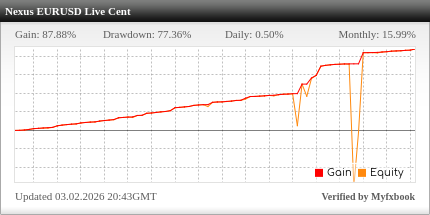
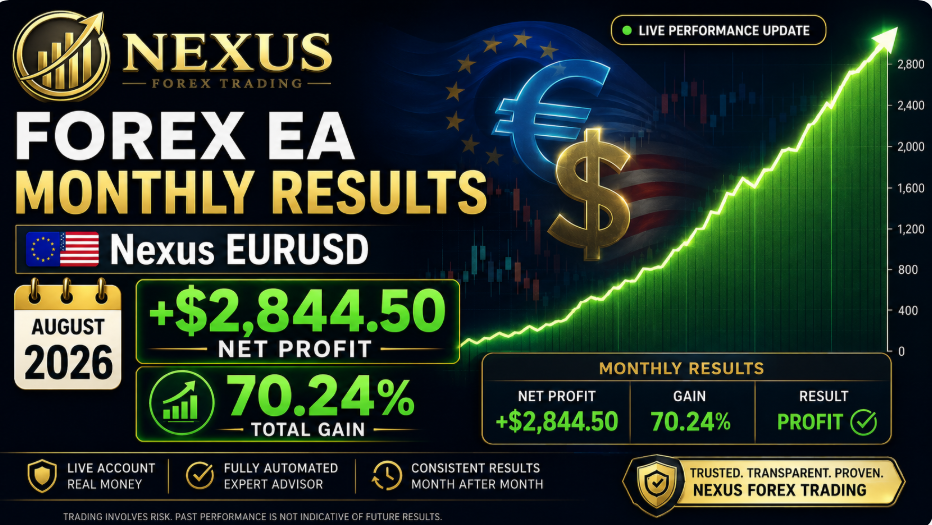
Screenshots and backtests should not be your only source of information when evaluating a Forex EA. Nexus publishes a real-money EURUSD trading account through Myfxbook so Australian traders can inspect its public history, equity, drawdown, monthly results and trading activity.
The publicly tracked Nexus account is a real-money cent account running the EURUSD strategy. Cent accounts display monetary values in cents, so equivalent dollar figures reported by Nexus are divided by 100 where applicable.
Do not judge an automated strategy from a single return figure. Review the equity curve, historical drawdown, trading frequency, difficult periods and overall length of the track record.
Important: this public account provides evidence for the Nexus EURUSD strategy. It should not be presented as independent live verification of the GBPUSD strategy.
Past performance does not guarantee future results. Execution, spreads, slippage, leverage, position sizing, configuration and market conditions can affect results.
You have seen the public EURUSD account. The next step is not to fund a broker account. Instead, test the complete Nexus EURUSD + GBPUSD EA in your own demo environment for 60 days.
Nexus prepares an account-specific EA licence for the demo trading account number you provide. Your MT4 or MT5 files and setup information are normally sent by email within approximately 8–24 hours.
You can then use the 60-day period to confirm installation, watch the EA operate and decide whether Nexus is appropriate for you.
VIEW SETUP GUIDEAustralia has an established retail Forex and CFD market. From the perspective of a Nexus user, however, the most useful questions are practical: does your account support the required MetaTrader platform, are Expert Advisors permitted, what trading costs and execution conditions apply, and which legal entity provides the account?
Nexus focuses on EURUSD and GBPUSD instead of attempting to trade every market through one generic strategy. The EA logic runs through MetaTrader, so the strategy itself is not geographically dependent on the trader being located in Australia.
Australian residents should check the exact broker entity offered during registration and review the provider's current Product Disclosure Statement, Financial Services Guide, terms and risk disclosures before opening or funding a live account.
ASIC's CFD product-intervention measures currently restrict leverage for Australian retail clients to 30:1 for CFDs referencing major currency pairs.
Vantage and AvaTrade currently publish Australian regulated entities. Always verify that the entity shown during your own registration is the one you intend to use.
Regulation alone does not establish Nexus compatibility. Confirm that the exact account supports MT4 or MT5 and permits the Expert Advisor functionality required.
The Australian Nexus pathway is deliberately structured so you can evaluate the EA before any live-broker decision.
Examine the public Nexus EURUSD Myfxbook account and understand the risks before requesting access.
Request an account-specific 60-day demo licence for MT4 or MT5. No Preferred Broker is required.
Install Nexus, use an appropriate lot size and observe how the EA behaves in your own demo environment.
If you want to continue, choose free live access through an eligible funded Preferred Broker or the $499.95 Own Broker Licence.
The free demo is the recommended starting point. The other two routes only become relevant if you decide you want to continue using Nexus beyond demo testing.
Test the complete EA before making a live trading decision.
For users who independently decide to continue with Nexus on a live account.
Use Nexus through another technically compatible broker.
You do not need either of these brokers to receive the free 60-day demo. They become relevant only if, after testing Nexus, you decide that you want to continue using the EA on a live Preferred Broker account.
Vantage Global Prime Pty Ltd currently identifies itself as the Australian issuer under AFSL 428901.
If you independently decide to use Vantage after your Nexus demo, use the official Nexus referral route and confirm that the account offered to you is suitable for MT4 or MT5 Expert Advisor trading.
OPEN VANTAGE THROUGH NEXUS →
Ava Capital Markets Australia Pty Ltd currently identifies itself as regulated by ASIC under licence 406684.
If AvaTrade is your preferred live route after demo testing, use the official Nexus referral route and verify the MetaTrader platform and account conditions presented during registration.
OPEN AVATRADE THROUGH NEXUS →RoboForex currently states that RoboForex Ltd and its partners do not work in Australia. For that reason, the Australian Nexus page does not present RoboForex as an available Preferred Broker option.
Nexus has commercial referral relationships with selected brokers. If an eligible client independently decides to open and trade through an official Nexus referral route, Nexus may receive commission or partner compensation from the broker.
Any money you choose to place in a live trading account is held through the relevant broker relationship, subject to that broker's own terms and legal entity. Nexus Forex Trading does not hold or custody your broker funds.
Nexus does not require your trading password to verify or licence the EA. Eligibility for free live Nexus access is based on the qualifying account and referral relationship, not access to your broker login credentials.
Broker funding, spreads, commissions, swaps and other trading costs are separate from the Nexus software licence.
Broker brands can provide services through different entities and account types. If you eventually move from demo to live, evaluate the actual Australian account you are being offered.
Successful EA operation depends on more than having the software file. MetaTrader setup, compatible broker execution, position sizing, chart configuration, stable uptime and ongoing monitoring all matter.
1. Request the free demo. Start with one MT4 or MT5 demo account — no broker referral is required.
2. Install Nexus correctly. Load the account-specific EA and follow the pair-specific chart instructions.
3. Use an appropriate lot size. Keep position sizing low while learning how the EA behaves.
4. Observe the EA over time. Use the full 60-day period rather than judging the strategy from only a few trades.
5. Decide whether you want live access. There is no obligation to move from demo to a live Nexus account.
An Expert Advisor can automate trading decisions and execution, but it cannot eliminate losing trades, drawdown, execution differences or market risk. The free demo exists so you can observe the EA before deciding whether you want to expose real capital to the strategy.
Do not treat the 60-day demo merely as an installation test. Use it to observe trading frequency, open positions, losing periods, lot sizing and your own reaction to changes in account equity. Only consider live trading when you understand both the software and the associated risks.
Position sizing and total exposure should remain appropriate for the capital and risk you are prepared to accept.
Nexus configuration allows lot-size control. Starting smaller provides greater room to understand the EA before increasing exposure.
Evaluate equity, open exposure and drawdown rather than looking only at headline account balance.
Nexus can assist with software licensing and installation but cannot guarantee trading outcomes or prevent losses.
No Preferred Broker decision is required today. Test the complete Nexus EURUSD + GBPUSD EA on your MT4 or MT5 demo account 100% free for 60 days, review the public EURUSD results and decide what you want to do afterwards.
Already completed your demo? View Australian live-access options →