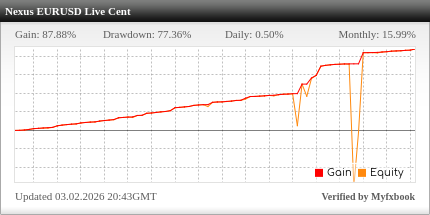
12 / 12positive live trading months
+$53,674net closed-trade result, on a $19,000.00 starting balance
3,709live EURUSD trades reported on last 12 months
233 / 237trading days closed positive
Real-money EURUSD cent account on Myfxbook, closed-trade figures from the monthly reports. Past performance does not guarantee future results.
How it worksThree steps to your free live trading licence
No software to buy and no subscription. You trade through a partner broker; we verify the link and licence Nexus to your account.
1Pick your broker
Choose RoboForex, Vantage Markets or AvaTrade and tell us where to send your setup steps.
1 minute 2Open or link, then fund
Open a live MT4 or MT5 account through the Nexus link, or ask the broker to link your existing account. You decide the deposit.
At your broker 3Submit and trade
Send us your live account number. We verify it and email your licensed EURUSD and GBPUSD files with the setup guide.
12-24 hours Three Preferred Brokers, one free licence
All three offer MetaTrader accounts. Pick the one available in your country that suits you; your Nexus licence is free with any of them.
RoboForex
- MT4 and MT5
- Cent accounts available: the account type our public live account uses
- Restrictions apply for UK residents
Start with RoboForex →Vantage Markets
- MT4 and MT5
- Several regulated entities; check which serves your country
- Existing clients can ask to be linked to Nexus
Start with Vantage →AvaTrade
- MT4 and MT5
- Account types vary by country
- Existing clients can ask to be linked to Nexus
Start with AvaTrade →Not sure which is available where you live? Check brokers by country. Broker spreads, fees, leverage and minimum deposits are set by the broker. Nexus may receive compensation from Preferred Brokers.
What you getThe complete Nexus package, not a cut-down free version
The free Preferred Broker licence gives you exactly the same software as the $499.95 Own Broker Licence.
EURUSD Expert AdvisorPair-specific logic on the M15 timeframe.
GBPUSD Expert AdvisorIts own logic and settings on the M5 timeframe.
MT4 and MT5 buildsFiles for the platform your account uses.
Risk settingsConfigurable account-level protection and lot-size guidance.
Setup guideInstallation, broker and VPS guidance, step by step.
Updates and supportCompatibility updates and help with installation.
One free licence per account, with no limit. Every eligible funded Preferred Broker live account you open can be submitted for its own free Nexus licence.
Check before you decideReal-money results, published every month
The Nexus EURUSD EA runs on a real-money account that anyone can inspect on Myfxbook. Here are the last six monthly reports.

| Month | Net result | Trades | Win rate |
|---|
| Sep 2026 | +$2,871.34 | 198 | 70.20% |
| Aug 2026 | +$2,844.50 | 168 | 70.24% |
| Jul 2026 | +$1,926.61 | 225 | 67.10% |
| Jun 2026 | +$3,835.73 | 238 | 61.76% |
| May 2026 | +$4,936.80 | 289 | 70.93% |
| Apr 2026 | +$3,067.63 | 272 | 69.12% |
USD equivalent of closed trades (cent account ÷ 100). Equity and drawdown are on Myfxbook. EURUSD only: there is no public GBPUSD live record.
Choose your licenceTwo ways to run Nexus live
Most traders choose the free Preferred Broker licence. The Own Broker Licence is there if you would rather stay with your current broker.
Recommended · Most popular routePreferred Broker Live LicenceFor funded live accounts with RoboForex, Vantage Markets or AvaTrade, linked to Nexus.
$0 - 100% FreeNo software purchase, no subscription, 100% Free
- EURUSD and GBPUSD Expert Advisors
- MT4 and MT5 builds
- A free licence for every eligible funded account
- Configurable risk and equity-protection settings
- Setup guide, broker and VPS guidance
- Product updates and installation support
- Verified and emailed within 12-24 hours
Keep your brokerOwn Broker LicenceFor any compatible broker outside the Preferred Broker programme.
$499.95One-time payment
- EURUSD and GBPUSD Expert Advisors
- MT4 and MT5 builds with presets
- 1 live + 1 demo account licence
- Configurable risk settings
- Setup guide, updates and support
Not ready to go live? Test the complete EURUSD + GBPUSD EA free on a demo account for 60 days. No broker requirement.
Get the free 60-day demoHow can the live licence be free?
Brokers fund it
When you open and trade through a Nexus link, the broker may pay Nexus partner compensation. That pays for development and support, so your licence costs $0.
Your money stays yours
Your deposit goes to your own account at the broker. Nexus never receives it, never controls it and never asks for passwords.
You choose the amount
Nexus does not set a deposit or ask what you funded. Brokers have their own minimums; only trade money you can afford to lose.
Normal broker costs apply
Spreads, commissions and swaps are set by the broker, as with any trading account. The Nexus licence itself is free.
Compare all three options
| Preferred Broker live | Own Broker Licence | 60-day demo |
|---|
| Nexus cost | $0 | $499.95 one-time | Free |
| Live trading | Yes | Yes | No, demo only |
| Live accounts | Unlimited eligible accounts | 1 | — |
| EURUSD + GBPUSD EAs | Included | Included | Included |
| MT4 and MT5 | Yes | Yes | Yes |
| Broker | RoboForex, Vantage or AvaTrade | Any compatible broker | Any demo account |
| Setup, updates, support | Included | Included | During the demo |
| Best for | Ready for live, open to a partner broker | Staying with your broker | Testing first |
Before you get started
Is the live licence really free?
Yes. Funded live accounts with RoboForex, Vantage Markets or AvaTrade that are opened through or linked to Nexus receive the complete EURUSD and GBPUSD package with no software charge and no subscription. Normal broker trading costs apply.
Is it a limited "free version"?
No. It is the same software as the $499.95 Own Broker Licence: both EAs, MT4/MT5 builds, settings, setup guide, updates and support.
Why does the account need to be funded?
The free licence is funded by broker partner compensation, which only applies to live trading accounts. If you only want to test Nexus, use the free 60-day demo instead.
How much do I need to deposit?
Nexus does not set or ask about your deposit. Each broker has its own minimum and account types. RoboForex offers cent accounts, which let you trade live with smaller trade sizes. Only trade money you can afford to lose.
I already have an account with one of these brokers. Can I use it?
Often, yes. Ask the broker to link your profile to the Nexus partner code (RoboForex eerse, Vantage RsPGL2ej, AvaTrade 221174). Our free live access page gives you a ready-written message to send them.
How many free licences can I get?
One per eligible funded Preferred Broker live account, with no limit on the number of accounts. Submit each account separately.
How long does it take?
Starting takes about a minute. Opening and funding the account happens at the broker. Once you submit your account number, verification normally takes 12-24 hours and your files arrive by email.
Do you need my password or access to my money?
No. Nexus needs only your broker, platform and account number. Your money stays in your own account with the broker.
Does it work on MT4 and MT5?
Yes. You receive the builds for the platform your licensed account uses.
Can I see results before I start?
Yes. The EURUSD EA runs on a public real-money account on Myfxbook, and every month has a published report. There is no public live record for GBPUSD.
What if I want to keep my current broker?
Choose the Own Broker Licence: $499.95 one-time for one live and one demo account with any compatible broker.
Can I test it first?
Yes. The 60-day demo is free, includes the full package and needs no Preferred Broker account.
Does Nexus guarantee profits?
No. Live results and backtests do not guarantee future performance. Forex and CFD trading involves significant risk of loss.
Get the full Nexus EA live, for $0
Pick a Preferred Broker, open or link your live account, and we licence both EAs to it within 12-24 hours of your submission.
Keep your broker? Own Broker Licence, $499.95 · Not ready? Free 60-day demo